
Thank you for wanting to add your Accommodation, Activity or Club/Spa to the Barefoot website. (Remember that you can submit new beaches for inclusion for free here).
Reasons to add your Listing
Get seen on the Barefoot website, a Large & Growing Directory of Beaches, Accommodation and Clubs/Spas and activities across the world with reviews from naturists.
All new entries get a mention in the Barefoot Newsletter and on BlueSky and on the Captain’s Facebook page.
Black Friday Deal:
Register a Standard listing and automatically get upgraded to a Premium one for free for the first 12 months.
To add your entry, do the following. All links open in a new Browser tab so that you can keep these instructions.
1. Register, if you haven’t done so already
2. Sign in and go to your Dashboard
3. Create and pay for a new Listing
4. Add/Update the Listing details
5. Wait for your Listing to be Approved
6. (optional) Update existing listings at any time, or start a new one.
Step by step Guide
If you are unsure of the next step, please contact the Captain for help.
1. Click here to Register, if you haven’t done so already
Skip this step if you have already registered.
2. Sign in and go to your Dashboard
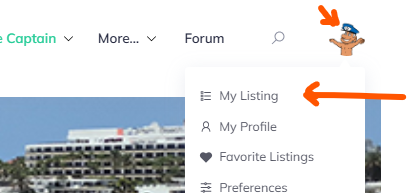
Click here to sign in and then click the “My Listing” option
3. Create and pay for a new Listing
Click on the ‘Submit Listing’ button on the page ( ) and choose the category that you want to add (e.g.’accommodation’)
Choose whether you want a standard listing or a Featured one to stand out more & to display more features. Click the ‘Continue’ button to select.
Select ‘Stripe’ as the Payment method (there are no other options) and click ‘Pay Now’. Follow the ‘Pay’ link to make payment using your Credit or Debit card.
Once paid you will be emailed a Payment receipt and there will be an Order confirmation on screen. Click on ‘submit Listing’.
On the next page, click ‘Continue’ on the plan that you have Purchased with the green ‘Active’ highlight 
4. Add/Update the Listing details
Fill out as many details as you can.
- For the map, you can either enter the co-ordinates or you can drag the map pin to your location (zoom the map out and in, keeping the pin in the centre)
- For the location you can scroll down to find your location. Please add both the Country and Region (you will need to add each one separately). If your country or region does not exist, leave it blank and tell the Captain. He will create it and update your Listing.
- Images – please add at least one image and make sure that the longest edge of all the images is no more than 1000px.
Once you have filled in the details you can click ‘Update’ (Note that you can edit and update your listing at any time).
Check how it looks and click “Continue To Publish” at the bottom of the page.
5. Wait for your Listing to be Approved
The Captain will review it and email you when it is Approved.
6. (optional) Update existing listings at any time, or start a new one.
You can carry on editing if you want, or you can go back to your dashboard to add a new Listing.
Thank you!
Any questions, please email the Captain.